This guide is designed to turn a new user into a confident one: it walks through how DAAF works, what it produces, what to expect, and where it can fail. If you have questions about anything you read here, you can paste any confusing passage into your Claude Code session and ask for help. Claude has access to all of DAAF's documentation and can help you understand it as you go.
What is DAAF?
DAAF is an AI-powered research assistant that helps you go from a research question to a completed analysis (including data acquisition, cleaning, statistical analysis, visualizations, and a written report) while keeping you in control of every decision. It runs inside a tool called Claude Code (Anthropic's AI coding assistant) on your computer. You interact with it by typing instructions in plain English, and DAAF handles the technical work while checking in with you at key decision points. Claude Code is a powerful general-purpose AI coding assistant, but it wasn't designed specifically for research: DAAF adds the structure, the domain knowledge, and the safety guardrails that turn it into a rigorous research tool.
Ignoring the fancy terms for a moment (agents, subagents, skills, orchestrators) DAAF is just a series of pre-cooked "recipes" of context that get handed to Claude at exactly the right moments. Every single design decision in DAAF comes down to telling Claude exactly what it needs to know, when it needs to know it, so it does what you want more often and with higher quality on average -- transparently and rigorously and reproducibly, like a scientist would prefer.
Why that works, and why it matters so much, becomes much clearer once you understand how these AI systems actually operate under the hood. So that's where we'll start. You need to know this before you do anything else with DAAF, because it will fundamentally shape how you use and interact with it, as well as what you should expect from it.
How LLMs Actually Work
Every large language model (LLM) assistant (e.g., Claude, ChatGPT, Gemini) is, at its core, an autocomplete engine. It takes a sequence of words and tries to come up with the next best, most sensical word in that sequence -- then the next, then the next. I like to describe modern AI as autocomplete with an extremely fancy hat: the hat keeps getting fancier, but the mechanic underneath hasn't changed. Everything crazy you've seen an AI do like writing code, building slide decks, and searching the web, all fundamentally stems from this one simple but extremely flexible mechanic.
That mechanic is also the technology's fundamental flaw. Predicting the next plausible word is not a process grounded in truth or correctness. When an LLM gets something wrong and "hallucinates," it isn't malfunctioning: it's just making stuff up the way it always does, predicting a word that happens to imply an untruth or an unfact. To see how this works (and why there's still real hope for making these tools useful), take a sequence of words:
Note: Fake data/example for illustration purposes only!
The model turns the words it's given into mathematical points in space and uses complex math to predict the next word (to wildly oversimplify, you can almost imagine it plots a sort of best-fit prediction/regression line) then picks somewhat randomly among the top candidates above the threshold of likelihood.
That random selection among top candidates is intentional, by the way: model providers add it deliberately to produce variety and something resembling creativity. But it also means the same question can get different answers on different days: pizza today, cheese next week, ice cream tomorrow. It'll also change based on exactly how we phrase the question itself. If we're asking these systems for anything factual or truth-based, we are going to be disappointed.
Two Kinds of "Memory"
So if these systems aren't grounded in truth, how could they possibly be useful for science -- which requires truth and fact and rigor and care? Here's a mental model that helps (it's not the most accurate technical description, but it's a substantively useful one): an LLM almost draws on two kinds of "memory" when it fills in that blank.
Its long-term memory is the training data -- any given LLM model "reads" essentially every publicly available book, code repository, Wikipedia article, and Reddit thread to form a baked-in, fuzzy understanding of language and the world when it is first created. When a model relies solely on this long-term memory, it's piecing together a bunch of fuzzy information all at once without really getting any of it quite right -- it will confidently make stuff up, and it will often be wrong in the details. You can imagine at least in part because it has so much data to influence it, and because a lot of that information may conflict. Its short-term memory is information that is provided directly to it in something called the context window -- the instructions, documents, and conversation you provide directly, sitting presently in its "mind" as you chat with it. When the model works from material in its short-term memory, its informational recall and specific topical synthesis are far more precise and far more useful.
Reliability bars are directional, not measured -- the point is the gap. Working from curated short-term memory is far more reliable than recalling from fuzzy long-term memory, though neither is ever guaranteed.
The practical implication: whenever we can shift an LLM's work from relying on its long-term memory to instead relying on what we carefully curate and provide directly to it in its short-term memory, we get a lot better performance out of it, and it becomes much, much more useful. To see what that looks like, return to our "favorite food" sentence from earlier: this time with a rich paragraph of context placed directly into the model's short-term memory:
Note: Fake data/example for illustration purposes only!
A sufficiently advanced model recognizes that Janice is a distinct person whose preferences stand in opposition to the speaker's -- and the entire prediction shifts accordingly. Nothing about the model changed; only the words it was given, and how it then leverages that important provided context to shift how it thinks the rest of the words should look.
This single move is the key: nearly everything that has happened in AI over the past year is, one way or another, just a version of leveraging this "short term memory" in increasingly creative and robust ways to get better outputs from LLMs for specific tasks. If we give it domain expertise in the context window, if we give it core data documentation info, if we give it data analysis API references, we start to get less noise and more quality, grounded output. To be really clear, though: it is still a probabilistic engine underneath, not a truth-based one, and so will always be at risk of getting it wrong. No amount of finagling with short-term memory can fully guarantee success.
Context Windows and Context Rot
While all of that is really valuable and important, different models can only "digest" a certain amount of context before predicting the next word. That capacity is known as the model's context window. (Capacity is technically measured in tokens -- word fragments, with one token roughly 3/4 of a word -- but thinking in words is close enough.) For perspective: GPT-3 could only really "read" about 1,500 words -- any more than that was ignored or would break it. Current Claude Opus models handle roughly 150,000 words out of the box, and can run with a much larger window of about 750,000 words (roughly a million tokens). DAAF's setup enables that larger ~1-million-token window by default. Expanding this capacity is one major frontier of model advancement, because the more context a model can hold, the more expertise and framing it can use for the task at hand.
But more context isn't automatically better, because not all context is treated equally: models weigh different parts of their context in complex, sometimes unpredictable ways. Fill the window with scattered, conflicting, or poorly structured material, and the model becomes confused, erratic, and forgetful. This failure mode is called context rot, and it needs to be avoided at all costs.
One subtlety that catches many people: in a chat, everything accumulates. Your first message and the model's response become part of the context that shapes its next response, and so on. Ask for help revising a syllabus, then drafting a letter to your mom, then picking a TV show, and by the third request the model is working from a weird middle-ground synthesis of all three. The generalizable advice: have focused conversations. One task per conversation; when you switch gears, start fresh.
From Prompt Engineering to Context Engineering
The craft of deciding exactly how to talk to an LLM and ask it to do what you want in clear, structured ways as you chat with it is known colloquially as "prompt engineering." It's more of an art than a science in most circumstances -- people are largely making things up as they go and seeing what works, which means new expertise is forming in really informal communities like Reddit and X.
The most recent wave of model advancement goes a step further. Models can now read many documents you provide to it directly, and moreover interpret what you're asking for and assemble their own context dynamically: reading files they judge relevant to your request beyond what you've suggested, searching the web for current information, even delegating side-conversations to separate AI assistants whose findings flow back into the main conversation. Designing the systems, instructions, and processes that help an LLM intelligently manage and piece together its own short-term memory is called context engineering. It's a step beyond prompt engineering (which is about crafting individual prompts well) into something more architectural: how do you set up an entire system so the right information gets loaded at the right time, every time?
Your message is one slice of a carefully assembled stack. Change anything above it -- the instructions, the loaded reference files, the conversation history -- and you change the response, often fundamentally.
Every advance you're watching in AI right now -- agents, skills, MCP servers, orchestration frameworks -- is just a different way of doing the same thing: curating what sits in the model's short-term memory, in increasingly sophisticated and automated ways, before it responds. That's really all they're doing. Learning to manage that context thoughtfully and deliberately is the highest-leverage AI skill you can build right now, regardless of what you're using AI for.
No amount of clever context engineering changes the underlying mechanic. These tools can never guarantee correct output -- they can only improve the odds of useful output. And knowing whether output is actually good requires a human expert in the loop who can review, catch, and correct it. This is why DAAF treats you as the principal investigator -- the one in the driver's seat, never a passenger: it is designed to augment your hard-earned expertise and skills rather than replace them.
Three Dimensions of AI Capability
One useful way to think about where AI is right now -- and why people seem to disagree so strongly about how capable it is -- is to think about AI capability as having three interdependent dimensions:
- The Mind -- the base model's raw intelligence and reasoning ability. This is what Anthropic, Google, and OpenAI are competing on with each new model release.
- The Body -- the orchestration frameworks and tooling that let the model actually do things: read files, run code, search the web, delegate tasks to other models. Claude Code is the "body" that lets Claude's "mind" interact with your computer. DAAF adds a much more structured and capable body on top of that.
- The Instructions -- your skill in communicating what you want, plus whatever pre-built instructions the system provides. This covers everything from how you phrase a question to how an entire orchestration system like DAAF structures its instructions behind the scenes.
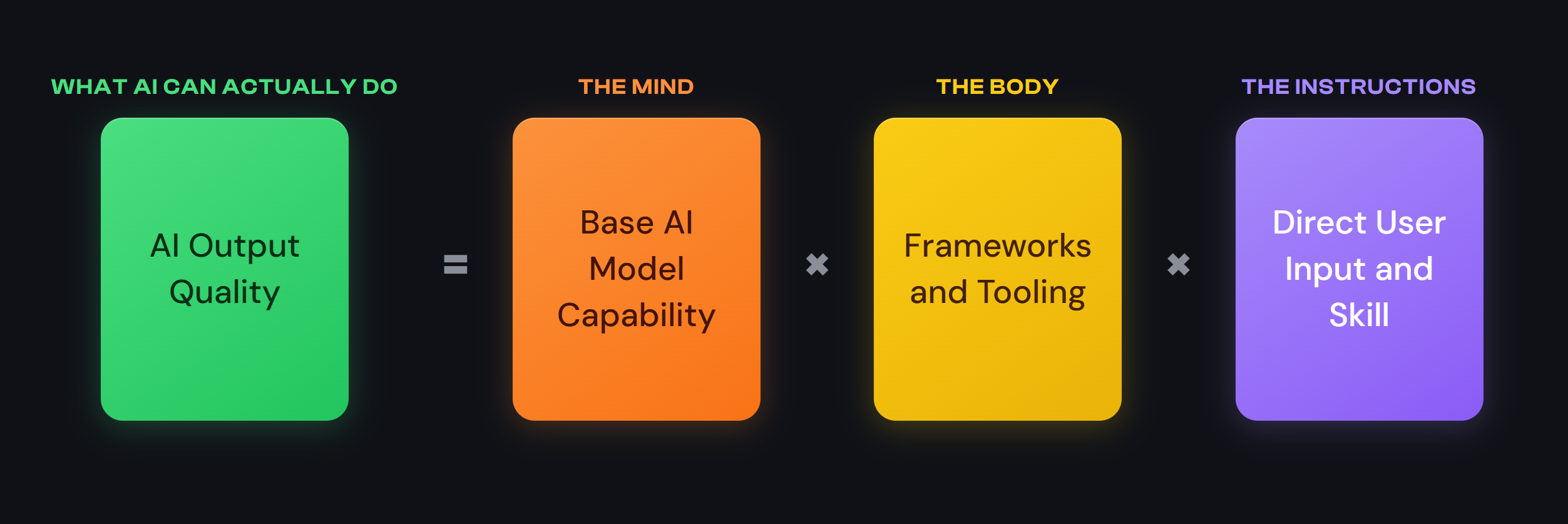
Each dimension is necessary but insufficient on its own. A brilliant model with no tools can only chat. Powerful tools connected to a weak model will produce sophisticated-looking garbage. A strong model with great tools but vague instructions will go confidently in the wrong direction. The real capability of any AI system is a product of all three working together -- which is why blanket statements about "what AI can and can't do" are so often wrong. It depends enormously on the configuration.
Notice that the second and third dimensions are exactly what we just covered: the Body is tooling that lets a model act on the world and curate its own context, and the Instructions are context engineering made concrete. That's what DAAF is, at its core -- a context engineering framework designed specifically for research workflows. Everything in DAAF -- the skills, the agents, the orchestrator, the progressive loading of reference files -- is fundamentally an answer to the question: "What context does Claude need right now to do this specific research task well?" The Open Augments Field Guide ↗ has more detail on these concepts.
This framework also explains why people have such wildly different experiences with AI. Someone chatting casually with a basic web interface is experiencing one narrow slice of what's possible. Someone using Claude Code with DAAF and well-crafted prompts is operating in a genuinely different capability regime -- not because the underlying model is different, but because the other two dimensions are dramatically more developed. The information gradient here is steep: a lot of people are still having the "AI is dumb, it can't count the Rs in strawberry" experience, while people who have invested in tooling and instruction quality are seeing capabilities that are invisible to casual users, and vice versa. This is a significant part of why discourse around AI can feel so polarized -- people are often talking past each other because they're working with very different combinations of these three dimensions.
From Intuition to Design: The Three Challenges
With that shared understanding in place, the design problem comes into focus. If we want an autocomplete engine -- however fancy the hat -- to support real research, there are three big challenges that anyone building (or evaluating) such a system will need to grapple with in some way, shape, or form:
- Teaching it to think like a researcher. If we want that short-term memory filled with really useful material, what does it actually contain? It's worth pausing on the underlying question: what are the core scientific principles we hope and expect human researchers to be trained to protect and embody -- and what would those look like written down as instructions and reference files? It's not a perfect one-to-one translation, but it tells us what we're trying to preserve.
- Context engineering across the entire research workflow. Research isn't one task; it's dozens of very different ones. What a careful researcher needs to know while profiling an unfamiliar dataset is completely different from what they need while specifying a regression, or interpreting complicated, conflicting results. If the research process were easy to teach, it wouldn't take a PhD to learn it -- but it does, because it's really hard. Dynamically adapting what context an AI receives at each stage is a huge engineering challenge.
- Proactively mitigating harms, costs, and risks. There's the big stuff -- deleted data, leaked credentials, a misdirected email. And then there's the small stuff that matters most for research: a coding error that seems right but isn't, an interpretation that seems right but isn't, a statistical method that seems right but isn't. What permissioning, oversight, and review processes let us work confidently with a collaborator we know will sometimes be wrong?
Notice that these questions sound less like configuring software and more like teaching a new colleague and setting up a research lab. Those are exactly the design considerations behind everything that follows.
The rest of this page is, in effect, DAAF's answer sheet. The skills and agent protocols are the answer to teaching it to think like a researcher. The engagement modes and orchestrator workflow are the answer to context engineering across the entire research process. And the dual-layer validation system is the answer to proactively mitigating harms, costs, and risks.
The Mental Model: Orchestrator, Agents, Skills
You don't need to understand the architecture to use DAAF -- you can absolutely just type a research question and let it run. But if you want to understand why DAAF does what it does, why it pauses when it pauses, and why the output is structured the way it is, this section will hopefully make all of that click.
Thoughtfully shaping context is how we move Claude from what I lovingly describe as an over-eager recent MBA graduate -- terrible memory, very quick to please you -- into something much closer to a careful research colleague. Even after all that shaping, they're still an over-eager MBA grad at heart, so you'll still want to review their output before it goes out into the world. So I'm going to use an analogy that I think captures DAAF's architecture well: DAAF is intended to mirror the workflows of a well-run research lab with you as the lead researcher -- the PI, in lab terms.
The Orchestrator: Your Lab Director
When you type a message to DAAF, you're talking to the orchestrator. Think of the orchestrator as a lab director -- the person who takes your research question, figures out what needs to be done, decides who on the team should do each piece, coordinates the whole effort, and reports back to you at key milestones.
The orchestrator should NOT be doing the hands-on work itself, because its primary value-add and contribution is coordination and workflow management. It doesn't write analysis scripts, it doesn't clean data, it doesn't run regressions. What it does is:
- Classify your request into an engagement mode
- Delegate tasks in proper sequence to specialized agents
- Enforce quality gates
- Report progress to you and pause for your approval at key junctures
- Keep the big picture in mind
The orchestrator is the most important part of DAAF, because it needs to simultaneously understand the whole workflow and the broad context of the work, while also being technical enough and specific enough to give precise, targeted instructions and context to every other LLM assistant involved in the process.
Specialized Agents: Your Research Team
| Agent | Role in the Lab Analogy | What They Actually Do |
|---|---|---|
| research-executor | Technician/Analyst | Executes one data task at a time with meticulous pre/post validation |
| code-reviewer | Senior Technician/Analyst | Reviews every single script, looking for bugs, methodology errors, and data quality issues |
| source-researcher | Research Assistant | Deep-dives into a specific data source's documentation, caveats, and gotchas |
| data-planner | Research Design Lead | Synthesizes all preliminary findings into a detailed, executable research plan |
Trying to get Claude to do everything equally well within a single context window is impossible -- overloading one assistant with every responsibility and every reference file will ultimately confuse it and cause the dreaded context rot we covered earlier. This means we need to split responsibilities across "versions" of Claude provided very different instructions and behavioral protocols, each working with a lean, focused context of its own.
Agent vs. Subagent: An "agent" is the general term for any tailored set of behavioral protocols for an LLM assistant. As a user, you could ask Claude directly to take on an agent persona. However, in DAAF's default workflows, the orchestrator calls up and tasks each agent itself -- agents become "subagents" when called by the orchestrator rather than directly by you.
Skills: Your Team's Reference Library
If agents define behavior ("how should I work?"), then skills define knowledge ("what do I need to know?"). Skills are structured knowledge documents that agents load into their own context on demand. Think of them as specialized reference manuals that your research team pulls off the shelf when they need domain-specific information.
Skill categories include:
- Data source skills -- Out of the box, we include
education-data-explorerandeducation-data-queryfor finding and fetching data from the Urban Institute Education Data Portal, plus one skill for each major education data source, covering what endpoints exist, what variables mean and how they're coded, what caveats and limitations to watch for, what suppression rules apply, and historical context about data collection (Note: these are exemplar skills that should inform how you can make your own data skills via the Data Onboarding mode; DAAF is not restricted to the education data domain at all). - Technical skills --
data-scientistfor methodology and rigor principles, then a matched pair for each language you might work in:polars(Python) ortidyverse(R) for data manipulation,plotnine(Python) orggplot2(R) for static publication-quality plots,plotly(Python) orplotly-r(R) for interactive visualizations, andmarimofor reactive Python notebooks orquartofor reproducible R notebooks - Meta skills --
skill-authoringandagent-authoringfor extending DAAF itself
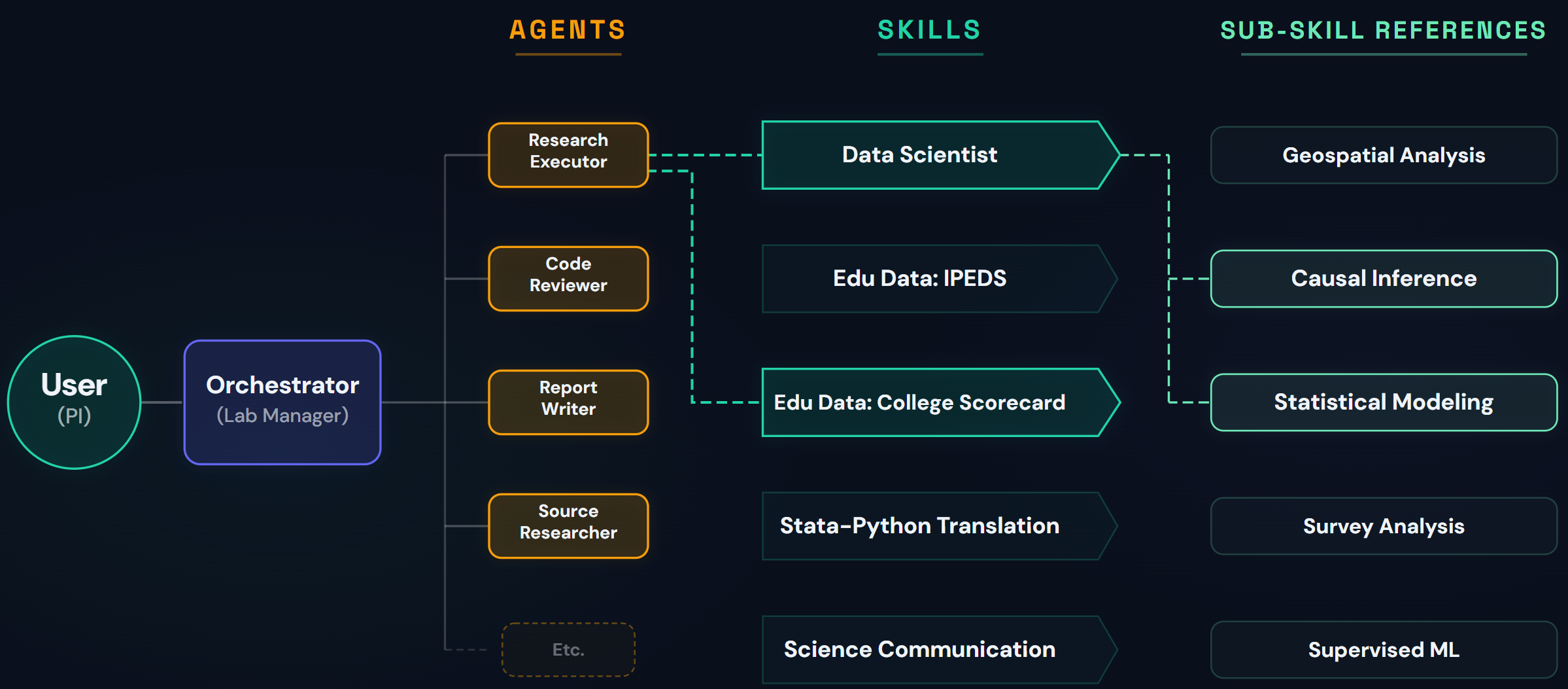
The key insight: in DAAF, skills are generally intended to be loaded by agents, not by the orchestrator. When the orchestrator delegates a task to the research-executor, it tells the agent which skills to load. The agent pulls up the relevant reference material, uses it to guide its work, and returns findings to the orchestrator. This keeps the orchestrator's context lean (it doesn't need to hold the full contents of every skill in memory) and ensures each agent gets exactly the knowledge it needs for its specific task.
 Click to expand
DAAF's multi-agent architecture: The user communicates with the orchestrator, which dispatches specialized agents. Each agent loads the skills it needs -- structured knowledge documents with optional sub-references for detailed guidance.
DAAF works like a research lab. You give direction to a lab manager (the orchestrator), who delegates work to specialists (agents) who consult reference materials (skills).
Four things to keep in mind as you use DAAF:
- In addition to the context engineering DAAF orchestrates behind the scenes, what you ask Claude to do and how you ask it to do it is an immensely important element of getting better quality output from DAAF/Claude.
- The system is designed to intelligently select and inject the right context to Claude before your query/question/chat, based on what you provide. But this is NOT foolproof, and simply cannot account for every possibility. Feel free to go off the beaten path at will -- just be aware that it's going to necessarily be less supported and structured from there.
- Because thoughtfully shaping the context is our way of shaping Claude's thinking, DAAF is built for frontier models and works them hard, taking advantage of their full context windows wherever possible. That does make DAAF genuinely compute-intensive -- pushing capable models to their limits is inherently so. But cost is a dial you control, not a fixed barrier: empirical benchmarking shows that several models drive DAAF's workflows excellently at very different price points -- including cheaper Anthropic tiers and high-performing open-weight alternatives (like Kimi K3 or GLM 5.2) via OpenRouter. The quality-cost tradeoff is yours to tune through your choice of model and provider route, and the DAAFBench results (which measure protocol adherence, not research quality or scientific validity) are the best starting reference for making that call.
- While DAAF's reference files, skills, and workflow instructions are all carefully designed to be loaded at specific moments, Claude may occasionally fail to load them, skip a step, or deviate from its instructions in subtle ways. When this happens, the agent falls back on its general training -- its fuzzy long-term memory -- and that's when hallucinations, fabricated variable names, and plausible-sounding-but-wrong details creep in. Verbose output -- which DAAF turns on by default (you can confirm it in Claude Code's
/configsettings) -- is particularly useful: it lets you see what DAAF's agents are actually thinking behind the scenes, including which files they're reading and which skills they're loading (or what shortcuts they're deciding on, if they are).
The Nine Engagement Modes
DAAF first classifies every request you make into one of nine engagement modes. Each mode triggers a fundamentally different workflow, different outputs, and different expectations. Understanding these modes is the single most useful thing you can do to work with DAAF effectively, because it helps you frame your questions in the way most likely to get you what you actually want, and better understand what's going on behind the scenes.
Before doing anything else, DAAF will tell you which mode it's classifying your request into, explain why, and ask you to confirm. This is intentional. You should always have the chance to say "actually, I just wanted a quick lookup" or "actually, let's go deeper on this."
| Mode | When to Use | What You Get |
|---|---|---|
| Data Lookup | Quick variable/dataset question | Direct answer with supporting context |
| Data Discovery | Scoping what data exists | Feasibility assessment, available sources |
| Ad Hoc Collaboration | Flexible working session | Thought partner for code, debugging, planning |
| Full Pipeline | Complete research analysis | Plan, scripts, notebook, report, all artifacts |
| Revision & Extension | Modify an existing analysis | New versioned artifacts, full QA |
| Data Onboarding | Profile a new dataset | Reusable data source skill |
| Reproducibility Verification | Verify a completed analysis | Reproduction Report with verdict |
| Framework Development | Modify DAAF itself | New/updated skills, agents, modes |
| User Support | Questions about DAAF/tools | Conversational help, no formal outputs |
Expand any mode below for trigger words, detailed descriptions, and guidance on when to use it -- and when not to:
Data Lookup
Trigger words: what are the values for, how is X defined, lookup, what does this variable mean, explain this table
A quick, focused lookup about available data tables and variables -- think of it as a data documentation oracle. DAAF loads a single relevant data knowledge source skill and gives you what you need quickly.
What you get: A direct, specific answer with supporting context (e.g., coded value definitions) and pointers to relevant documentation.
Expected time: Seconds. One question, one answer.
When NOT to use it: When your question is actually broader than you realize. If you find yourself asking five Data Lookup questions in a row, you probably want Data Discovery mode instead. DAAF will suggest this if it notices the pattern.
Data Discovery
Trigger words: what data exists, is it possible, feasibility, what's available, explore
A focused investigation into what data is available and whether an analysis is feasible -- think of it as a scoping partner. DAAF explores the landscape and reports back with available sources, year ranges, geographic coverage, key caveats, and a feasibility assessment. This is genuinely a great starting point for new users -- ask DAAF what it can do before asking it to do it.
Expected time: A few minutes of conversation, usually one or two exchanges. It may launch subagents to do some background research.
When NOT to use it: When you already know what data exists and you're ready to analyze it with a specific research question. In that case, jump straight to Full Pipeline.
Escalation: If Data Discovery turns up promising data, DAAF will suggest: "Based on these findings, would you like me to proceed with a Full Pipeline analysis?"
Ad Hoc Collaboration
Trigger words: help me with, review this, debug this, how do I, think through this with me
A flexible, multi-turn working session where DAAF acts as a thought partner. Review code, debug scripts, brainstorm analytic approaches, investigate a data source, or write a one-off analysis script. The conversation flows naturally -- change topics, ask follow-ups, and go wherever the work takes you.
What you get: A lightweight workspace for anything produced, plus access to all of DAAF's specialized capabilities on demand -- code execution, debugging, data source research, code review, analysis planning.
Expected time: As long as you need. No mandatory checkpoints or gates.
When NOT to use it: When you want a complete, formal analysis with a Plan, Notebook, and Report -- that's Full Pipeline. When you just need a quick variable definition -- that's Data Lookup. Ad Hoc Collaboration is for the messy, real-world middle ground where you're actively working on something and want a knowledgeable partner.
Escalation: If the conversation evolves toward a full analysis, DAAF will suggest formalizing it into a Full Pipeline. Your workspace artifacts carry forward either way.
Full Pipeline
Trigger words: analyze, research, create, generate, what's the relationship between
DAAF takes your research question and runs a complete analytic workflow across 5 phases: exploring available data, creating a detailed research plan, fetching and cleaning data, running analyses and creating visualizations, and delivering a comprehensive report with all supporting artifacts. This is what DAAF was fundamentally built to do as its main use-case (not to say the other modes aren't also very useful).
What you get: A detailed research plan, all raw and processed data files, validated Python or R scripts for every step, statistical analysis results and visualizations, a compiled Marimo (Python) or Quarto (R) notebook, a stakeholder report, and a lessons-learned document.
Expected time: About 20-30 minutes of active engagement time spread across four check-in points where DAAF pauses for your review and approval, a few hours of DAAF working independently in the background, then whatever time you (rightfully, importantly) dedicate to reviewing the final outputs -- plus whatever API fees you incur along the way. Full duration will depend heavily on how complex your query is: primarily how many scripts it needs to write, rewrite, and QA. Plan accordingly!
When NOT to use it: When you just need a quick answer, a variable definition, or want to know if certain data exists. Using Full Pipeline for a simple question is like driving a semi-truck to the corner store.
Revision & Extension
Trigger words: fix, update, change, modify the analysis, revise, extend
Modify or extend an existing analysis. Point DAAF to the project folder, and it reads the Plan and creates new versions of relevant artifacts -- it never modifies the originals. Versioning uses date suffixes: the original might be 2026-01-24, revision 1 becomes 2026-01-24a, revision 2 becomes 2026-01-24b, and so on.
Expected time: Depends on scope. Changing a year range might take 15 minutes; fundamentally rethinking the methodology could be nearly as long as a new analysis.
When NOT to use it: When the existing analysis is fundamentally flawed or you want a substantially different research question. Starting a new Full Pipeline analysis with better-targeted prompts will produce cleaner results than trying to revise the original into something it wasn't designed to answer.
Data Onboarding
Trigger words: onboard, ingest, profile this dataset, new data source, add my data, sensitive data that can't leave my environment
Provide a raw data file (CSV, Parquet, Excel) and DAAF runs a thorough profiling protocol across 3 phases (Setup, Profiling, Skill Creation). You review findings and confirm interpretations before DAAF creates a standalone data source skill that future analyses can reference.
A fork in the road -- the sensitivity gate: Right at the start, DAAF asks you directly whether your data is sensitive -- PII, proprietary, regulated (FERPA/HIPAA), locked in a secure enclave, or simply something that can't leave your environment. If it is safe to bring in, onboarding proceeds normally. If it isn't, DAAF takes a different path -- the synthetic-data protocol. Instead of importing your data, DAAF hands you a disclosure-controlled profiling script that you run yourself, wherever the data lives. Only a summary profile report crosses the boundary; DAAF then builds a realistically-shaped synthetic stand-in dataset and a data source skill from that report alone, so you can develop and debug your whole analysis against fake data. When your code is finished and vetted, you run it against the real data yourself, in its own secure environment, to get the actual results.
Keep in mind that this is a code-development scaffold, not an analytic substitute and not a formal privacy guarantee. The disclosure controls are careful engineering that minimizes what leaves your machine, but you always review the profile report yourself and confirm you're comfortable with it before it crosses the boundary -- your data-governance, disclosure-review, and legal obligations remain your own to meet.
Checkpoints: 2 -- one after project setup, one after profiling completes to review preliminary interpretations.
When NOT to use it: When you want to analyze the dataset rather than profile it -- that's Full Pipeline. Data Onboarding is about expanding DAAF's knowledge base, not running an analysis.
Reproducibility Verification
Trigger words: verify, reproduce, does this replicate, check reproducibility
Starting from an analysis's delivered audit notebook -- a Marimo .py for Python projects or a canonical Quarto .qmd for R -- DAAF re-runs each script, compares new outputs against the originals, and cross-references the Report's claims against actual results. The verdict is one of: FULLY REPRODUCED, PARTIALLY REPRODUCED, or NOT REPRODUCED.
What a "reproduced" verdict does and doesn't promise: it means DAAF re-ran the work and the results matched the original within reasonable tolerances -- not that every number came out bit-for-bit identical. Small, legitimate differences can arise: re-downloaded data may have been updated at the source since the original run, the software environment may have moved on, and some statistical methods involve a degree of randomness. Anything DAAF can't directly confirm is labeled NOT DIRECTLY VERIFIED rather than silently treated as a match.
Two key decisions: Whether to re-fetch data (default: yes) and methodological review depth (default: light). A deep review additionally scrutinizes statistical assumptions and interpretation quality.
When NOT to use it: When you already know the analysis needs changes -- use Revision & Extension instead.
Framework Development
Trigger words: create a skill, add an agent, modify DAAF, extend the framework
A structured collaboration mode for modifying DAAF itself -- its skills, agents, modes, reference files, templates, and configuration. The orchestrator scopes the current state, presents findings, then authors or modifies framework artifacts following canonical templates.
Checkpoints: 2 -- one after scoping (confirm approach), one after review (approve final state).
When NOT to use it: When you want to onboard a dataset by profiling it (use Data Onboarding) or run an analysis (use Full Pipeline).
User Support
Trigger words: what is DAAF, how does this work, help me understand, Docker, Git, Claude Code help
A lightweight, conversational mode for questions about DAAF itself and the tools it runs on -- Docker, Git, and Claude Code. No subagents are dispatched, no workspace is created, and no formal deliverables are produced. This is the only mode where DAAF itself is the subject, rather than your data or analysis.
Expected time: As long as you need. No checkpoints, no gates, no deliverables -- just a conversation.
When NOT to use it: When you already know what you want to do. If you have a specific data question or research task, jump straight into the relevant mode.
Escalation: When your questions evolve into action ("OK, I think I'm ready to try an analysis"), DAAF will suggest the appropriate mode. It routes, it doesn't gatekeep -- you never need to "graduate" from User Support before using other modes.
Mode Transitions
| From | To | When it happens |
|---|---|---|
| Data Discovery | Full Pipeline | Your exploration revealed a feasible, interesting analysis |
| Full Pipeline | Revision and Extension | You completed an analysis and want to adjust or extend it |
| Data Onboarding | Full Pipeline | You profiled a dataset and now want to analyze it |
| Ad Hoc Collaboration | Full Pipeline | Your working session evolved into something worth formalizing |
| Full Pipeline | Reproducibility Verification | You want to verify a completed analysis reproduces |
| Any mode | User Support | You have questions about how DAAF or its tools work |
DAAF supports clean transitions between any pair of modes where the shift makes sense. You don't need to memorize the transitions -- DAAF will suggest the right mode at natural breakpoints and wait for your confirmation. It should never silently switch modes on you.
Think of these as different types of conversations, from a quick factual question to a complete multi-hour research project. You choose the scope; DAAF adapts.
Try It Yourself: A Guided Progression
Rather than try to jump in with a complete Full Pipeline Analysis at once, I strongly recommend testing out the simpler features and engagement modes first. The whole premise of this project is that DAAF is surprisingly robust, but the right way to build confidence is to start small and work your way up. Here's a concrete progression I'd recommend, designed to let you assess DAAF's knowledge and capabilities at each level of complexity:
Level 1: Quick Ask (Data Lookup Mode)
Ask DAAF to explain a single dataset or variable you're already familiar with. This tests DAAF's domain knowledge against your own expertise.
Example: How is free/reduced-price lunch eligibility defined in the CCD data? What are the coded values?
What you're testing: Does DAAF know the data as well as you do? Are there gaps in its knowledge? Does it mention the right caveats? Feel free to ask follow-ups -- this is a safe, low-stakes way to calibrate your trust.
Level 2: Thorough Documentation Review (Data Discovery Mode)
Ask DAAF to help figure out what's available within a broad conceptual category of data. This tests its ability to explore multiple options, consider trade-offs, and notice year overlaps or gaps.
Example: I'm considering a research project looking at college and university finances. Can you help me explore what datasets and variables are likely to be of interest?
What you're testing: How does DAAF surface relevant information when faced with broader options and less explicit direction? Does it recognize strengths and pitfalls of each possibility?
Level 3: Data Onboarding
If you have your own dataset, try profiling it with Data Onboarding mode. This is a great way to expand DAAF's capabilities with your own data -- and to contribute back to the community by sharing new data source skills.
Example: I have a CSV of county-level election returns I'd like to profile and add as a data source. The file is at: /daaf/data/county-elections/election_returns_2024.csv
What you're testing: Can DAAF systematically profile a dataset you know well, detect its structure, identify coded values and quality issues, and produce a reusable skill? Do its preliminary interpretations match your domain knowledge?
Level 4: Single Variable Analysis (Simple Full Pipeline)
Ask DAAF to analyze a single variable from a single dataset you already know well. This kicks off a Full Pipeline run, but a very simple and approachable one.
Example: Can you analyze the distribution of school-level poverty rates across all public elementary schools in California for the most recent year available? I'm interested in basic descriptive statistics and a histogram.
What you're testing: Can DAAF correctly fetch, clean, and describe a dataset you're already familiar with? Do the descriptive statistics match what you'd expect? Is the cleaning approach reasonable? This is where you start validating DAAF's execution quality, not just its knowledge.
Level 5: Simple Correlational/Longitudinal Analysis
Ask DAAF to look at the relationship between two variables of interest, possibly over time.
Example: Help me understand how average school-level poverty rates have changed over the past decade for public high schools, broken out by urbanicity (city, suburb, town, rural). Show me the trends and any notable patterns.
What you're testing: Can DAAF handle multi-year data, create meaningful groupings, and produce time-series visualizations? Are the trends sensible? Does it properly handle years with data quality issues (COVID years, for instance)?
Level 6: Multivariate Analysis
Get more abstract and complex. Ask about relationships between multiple variables that require joining data sources and more sophisticated statistical approaches.
Example: What linkages exist between school-level resources (per-pupil expenditure, teacher-student ratio), student socioeconomic status, and access to advanced coursework? Can you tease apart these relationships?
What you're testing: Can DAAF correctly join multiple data sources, handle the complexity of multi-variable analysis, and produce interpretable results? This is where DAAF's rigorous validation pipeline really earns its keep -- there are many more places for subtle errors to creep in.
Pro tip: You can even ask DAAF what you should ask it: I'm trying to think of moderately complex research questions I could use to test the DAAF system, based on the education data available. Can you suggest a few options related to educational equity?
Level 7: Replication Exercises
The ultimate test: can DAAF reproduce results from published research? The Urban Institute's Learning Curve series ↗ leverages the same Education Data Portal datasets DAAF currently has access to, and many studies have open-source code available ↗ for direct comparison.
What you're testing: The gold standard -- can DAAF produce results consistent with published, expert-produced research? This is the most rigorous test possible and will surface any systematic issues in the pipeline.
If you run replication exercises, the community would genuinely benefit from hearing about your results. Share your findings by opening an issue ↗ -- this kind of validation is invaluable for the entire community.
Level 8: Charting Your Own Path
Once you're comfortable with the framework, start asking your own original research questions. You've built enough experience to know what DAAF handles well and where you need to pay extra attention. DAAF has strengths and limitations -- the goal is not to make the single, end-all-be-all best tool for everyone, but to create a unified, pretty good starting point with sensible defaults and opinionated standards of rigor.
Use it how you see fit -- and if you find ways to make it work better for you, the community would probably also benefit from you sharing that knowledge back with others. See Extending DAAF for more. This is a joint exploration endeavor, at the end of the day.
Anatomy of a Completed Analysis
When a Full Pipeline analysis completes, your project folder will look something like this:
The folder structure is identical whether you work in Python or R -- only the file extensions (.py vs .R for scripts) and the notebook format (a Marimo .py notebook vs a Quarto .qmd notebook) differ. R is a core execution lane engineered for parity with Python, not an afterthought: both languages run the same pipeline through the same stages, with the same validation, the same adversarial code review, and the same reproducibility standards. Python is the default, and you choose R once in your preferences -- everything downstream adapts. Parity is a goal DAAF builds toward rather than a finished fact, so a handful of method-level differences remain (a few methods are currently deeper in one language than the other); those are documented honestly, and reports of any gap you hit are always welcome.
Each artifact serves a specific purpose. The Plan.md is the single most important artifact in the project -- it captures everything about what was done and why. If the scripts are the "what," Plan.md is the "why." It includes the research question (verbatim), Research Outcomes (specific, measurable topics the analysis must investigate -- these define what must be examined, not what the answer should be), data sources with rationale, methodology with justification, a risk register, and a key decisions log. If any outcomes read like hypotheses (predicting a direction), flag them. Plan_Tasks.md contains the detailed machine-readable task specifications with the exact transformation sequence, dependencies, wave assignments for parallel execution, and input/output file paths.
The scripts/ directory is the real work product -- not the notebook. Get a sense for how these scripts are actually written and run: this is where DAAF's value lives. Without the core engine of data analysis being transparent, rigorous, and reproducible, nothing else that comes out of this process is valuable. Spend time here. Each script reads top-to-bottom like a lab notebook -- no functions, no classes, no jumping around -- with clear section headers, inline audit trail comments explaining intent and reasoning, embedded validation assertions, and an appended execution log showing exactly what happened when the script ran. When a script fails QA and needs revision, the original keeps its output (it's part of the audit trail), and the revised version gets a letter suffix: 01_task.py → 01_task_a.py → 01_task_b.py. The cr/ subdirectory contains the code-reviewer's independent QA inspection scripts for every analysis script.
The research notebook -- a Marimo .py for Python projects, a Quarto .qmd for R -- is assembled from the completed scripts. It's the presentation layer, not where analysis was done. What you won't see in the notebook: new analysis code, interactive dashboards, filter widgets, or additional transformations. This ensures what you see is exactly what was executed and validated, with nothing added or changed. The Report.md is a stakeholder-ready narrative synthesizing key findings, methodology, limitations, visualizations, and a references section (data sources, methodological references, software, and reporting standards -- DAAF tracks these automatically, though you should verify accuracy).
All data files use Apache Parquet format rather than CSV. Parquet preserves data types (integers stay integers, dates stay dates), compresses efficiently, and is fast to read. CSV files lose type information -- everything becomes a string -- which introduces subtle bugs. Parquet prevents an entire category of data quality issues.
STATE.md tracks the current state of the analysis -- which tasks are completed, which are pending, and any issues encountered. This is critical for multi-session work. LEARNINGS.md captures data source quirks, surprising findings, and methodological notes that might help future analyses.
Sample Projects
The DAAF repository includes sample projects in the research/ folder to illustrate what DAAF produces. The College Graduation Rate & Selectivity Analysis ↗ demonstrates a complete Full Pipeline run -- browse the Report ↗, the Plan ↗, a data fetch script ↗, or a statistical analysis script ↗ to see real artifacts. We've also created an intuitive, interactive, and highly-curated walk-through of this main sample project at See How it Works. A companion Reproducibility Verification ↗ shows what independent re-execution and verification looks like.
These projects are presented warts and all -- some of the interpretation is arguably overblown, and some analytical choices could be questioned. That's the point: DAAF produces work that is worth reviewing, not work that can be trusted blindly.
Dual-Layer Validation
This is where DAAF most directly confronts that third challenge -- and honestly, where the biggest gap exists in most ad-hoc, LLM-assisted analysis today. Remember the core mechanic: a probabilistic engine can never guarantee correct output, only better or worse odds of it. So DAAF assumes errors will happen and builds two independent layers of validation to catch them before they reach you.
Layer 1: Primary Validation (CP1-CP4)
| Checkpoint | What It Catches |
|---|---|
| CP1: After data fetch | Empty datasets, wrong data types, >90% missing values in critical fields |
| CP2: After data cleaning | Invalid coded values, suppression rates above 50%, impossible analysis types |
| CP3: After each transformation | Unexpected row loss (>90%), broken joins, surprise null values |
| CP4: Before final output | Missing required outputs, deviations from the plan |
Layer 2: Secondary Validation (QA1-QA4b)
| QA Checkpoint | What It Catches |
|---|---|
| QA1: After fetch scripts | Schema problems, ID uniqueness violations, suspicious distributions |
| QA2: After cleaning scripts | Incorrect coded value handling, flawed filtering logic |
| QA3: After transformation scripts | Bad join cardinality, aggregation errors, derived column mistakes |
| QA4a: After analysis scripts | Invalid statistical methods, violated assumptions, unreliable results |
| QA4b: After visualization scripts | Misleading charts, incorrect data sources, missing labels |
If a primary checkpoint fails, execution stops. Period. DAAF doesn't try to power through -- it reports the failure and either attempts a fix or escalates to you. Every script gets both layers of review, no exceptions, and the code-reviewer approaches each script with an adversarial mindset and inspects it immediately after execution, not batched at the end -- because an error in script 1 that goes undetected will silently propagate through scripts 2, 3, and 4, compounding into a mess that's far harder to diagnose and fix.
Why two layers? Because they catch different types of errors. Primary validation catches operational failures -- the data is empty, the types are wrong, something clearly broke. Secondary QA catches methodological errors -- the code runs fine and produces output, but the methodology is wrong, the join logic is subtly off, or the interpretation doesn't match what the data actually shows. These are the insidious errors that humans regularly miss when reviewing LLM-generated code, and they're exactly the errors that matter most for research integrity.
What this looks like in practice. Two real catches from a single documented analysis -- the same one you can step through in the Anatomy of a DAAF Analysis walkthrough. During data acquisition, the code-reviewer flagged that a variable named open_public was being interpreted as "open admissions" -- a sanity check showed Harvard and Stanford both coded as 1, because the field actually means "currently operating." The selectivity classification at the heart of the analysis would otherwise have been silently wrong. Later, during independent final verification, the data-verifier traced every key statistic in the draft report back to the raw script outputs and found a regression coefficient that had been plausibly invented rather than transcribed -- an error that changed the report's central claim -- and blocked delivery until it was corrected against the execution log.
The Full Pipeline Flow
The orchestrator coordinates several specialized agents for different tasks. You don't need to memorize who does what -- DAAF manages the team automatically. The important thing is understanding the overall flow and where your review points are.
- You ask a research question
- The orchestrator classifies the request as Full Pipeline and confirms with you
- The orchestrator delegates data exploration to a subagent
- The orchestrator delegates source deep-dives to source-researcher agents
- A synthesis agent consolidates all findings
- The orchestrator pauses for your review (Phase Status Update 1) ← your checkpoint
- A planning agent creates a detailed Plan, validated by a plan-checking agent
- The orchestrator pauses for your review again (Phase Status Update 2) ← your checkpoint
- An execution agent works through each task, with a code-reviewing agent inspecting each script
- The orchestrator pauses twice more for your review (Phase Status Updates 3 and 4) ← your checkpoints
- A notebook assembly agent compiles all scripts
- A report-writing agent creates the stakeholder report
- A verification agent performs adversarial final verification
- The orchestrator delivers everything to you
That's the core loop. Every piece has a job. Every job has a quality check. Every quality check has consequences (stop, revise, or proceed). And you get four mandatory check-in points where DAAF pauses and waits for your explicit approval before continuing.
Session Management
Real research analyses take time -- often more time than a single Claude Code session can handle. DAAF monitors its own context utilization to handle this gracefully:
| Utilization | What Happens |
|---|---|
| Below 40% and below 150k tokens | Normal operation |
| >= 40% or >= 150k tokens | DAAF starts delegating more to subagents |
| >= 60% or >= 200k tokens | DAAF finishes current work, warns restart may be needed |
| >= 75% or >= 250k tokens | DAAF finalizes STATE.md and recommends restart |
The thresholds above are the conservative profile DAAF applies to its default models (the Opus and Sonnet line). DAAF detects the exact model you're running automatically and applies the right profile -- you don't need to configure anything. Models with a validated longer quality horizon, such as the Claude Fable/Mythos family, get their own extended-horizon thresholds, so DAAF lets them work longer before recommending a restart.
When context runs low (or you choose to stop), DAAF writes a comprehensive STATE.md that captures exactly where work stands and provides a restart prompt -- a pre-written message capturing exactly what has been done and what needs to happen next.
How to Restart a Session
- Type
/clearin the Claude Code terminal to reset the session (this clears the context window but does not affect any files on disk) - Paste the restart prompt that DAAF provided
- DAAF reads STATE.md, picks up where it left off, and continues working
If you closed your terminal entirely or the session crashed, start a new Claude Code session and point DAAF to the project folder -- it will read STATE.md and figure out where to resume.
Reproducibility Verification mode note: Reproducibility Verification mode uses Reproduction_Report.md as its session state document instead of STATE.md.
Don't panic if a session ends mid-analysis. This is undesired but not unexpected for complex analyses -- the whole STATE.md system exists precisely for this reason. A session restart is not a failure state: DAAF is constantly toeing the line between giving Claude enough context to do good work and filling its context up so much that it becomes confused and erratic, and the restart is a deliberate pressure valve for maintaining that balance. Complex analyses may take several sessions, and each one picks up seamlessly -- and as painlessly as possible -- from where the last one left off.
Two practical tips: try to let DAAF finish its current "atomic unit" (e.g., executing + QA-reviewing a script) before stopping -- interrupting mid-script is recoverable but creates a messier restart. And you can always check progress at any point by asking DAAF: "What's the current status of the analysis?"
Where Things Live
You don't need to know what's in most of these directories. The two that matter to you are research/ (where your analyses live) and user_reference/ (where documentation lives). Everything else is DAAF's internal machinery.
| Directory | What's In It | Who It's For |
|---|---|---|
research/ | Your analysis projects | You |
user_reference/ | User documentation | You |
.claude/agents/ | Agent protocols (14 definitions) | DAAF (and curious users) |
agent_reference/ | Workflow documentation, templates | DAAF |
.claude/skills/ | Skill definitions | DAAF (and skill creators) |
scripts/ | Shared utility scripts | DAAF |
scripts/host/ | Host-side convenience scripts | You |
Everything you need to review, share, or reproduce is inside the project folder. You can copy the entire folder to a colleague and they'd have everything needed to understand and verify the analysis -- that's the whole point of reproducibility.
Browsing and Viewing Your Work
The simplest way to reach all of these is the DAAF Control Panel -- run bash daaf.sh (macOS/Linux) or .\daaf.ps1 (Windows) from your daaf-docker folder and pick the matching menu option. Each convenience script below also runs directly from that folder:
- Browse and edit project files:
bash run_vscode.sh(macOS/Linux) or.\run_vscode.ps1(Windows) -- opens a browser-based VS Code editor - View interactive notebooks (Python):
bash view_notebooks.shor.\view_notebooks.ps1-- opens Marimo's notebook browser at localhost:2718 - View Quarto documents (R):
bash view_quarto.shor.\view_quarto.ps1-- discovers every.qmdbelowresearch/, renders the one you pick to self-contained HTML, and opens it in your browser - View session logs:
bash view_logs.shor.\view_logs.ps1-- opens the DAAF Log Explorer, an interactive timeline that shows orchestrator actions, subagent dispatches, and tool calls in your browser at localhost:2719